Every OpenCode session, at a glance.
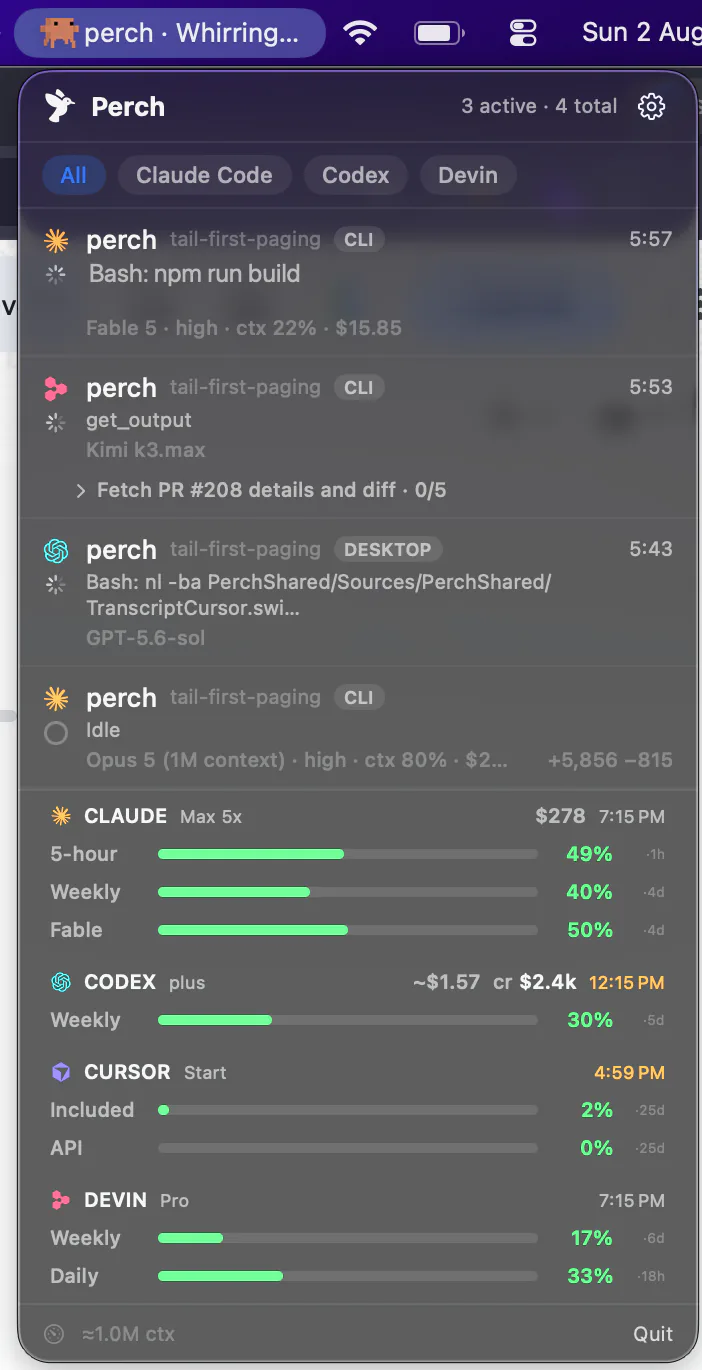
Perch sits in your menu bar and watches every OpenCode session on your Mac — live state, what each one is running, the tokens and the exact cost, and how much code it changed. Approve a permission or answer a question from your phone.
How it works
Nothing to configure, and a boundary it can’t cross
OpenCode 2
Read from OpenCode's own server
OpenCode 2 keeps every session in one background server, and Perch follows that server's event stream directly. Sessions from the terminal, the Desktop app and the web all show up live, with nothing to install and nothing to restart.
OpenCode 1
Installed into every OpenCode root Perch finds
OpenCode takes plugins rather than hook files, so Perch writes a small owned plugin into each root it discovers. It's owner-only, carries an owner marker and a hash of its own body, and refuses to overwrite a file it didn't write or that you've since edited. Removing the integration takes it back out and verifies it's gone.
A boundary
Metadata in, conversation left alone
On OpenCode 1 the plugin sends events and a signed helper inside the Perch app bundle does the validating, normalising and persisting; message bodies, text deltas, reasoning and attachments are never sent in the first place. OpenCode 2's stream does carry conversation text, and Perch reads none of it, except the questions of a form that is waiting on you, so it can answer it.
A fallback
Sessions from before you installed it
Perch also reads OpenCode's own session database — opened read-only, and aware of a write-ahead log so it doesn't miss what hasn't been checkpointed yet. That's what backfills Stats and what catches sessions the plugin never saw.
One thing to know on day one with OpenCode 1: it reads its plugins at startup, so a session that was already open when Perch installed its plugin keeps running without it and stays at Idle. Start a new session and it reports straight away.
What lands on the row
OpenCode tells Perch more than almost anything else does
Perch was built against Claude Code first, and most of what it learned there is only partly portable. OpenCode is the exception — its event stream carries nearly the whole set, so nearly the whole app works. Most of it holds for OpenCode 2 as well. Its sessions have no todo list, and an idle one leaves the list an hour after it last did anything, because the server can’t say whether a window still shows it.
Waiting, and ended
OpenCode says when it's asking a human and when a session is really over, so a row reaches “needs you” and then disappears — rather than sitting at idle, or lingering after the session is gone.
Five-part token counts
Input, output, reasoning, and cache reads and writes, split out rather than summed into one number — so a session that looks expensive can be read for why.
Exact cost, not an estimate
OpenCode reports what a turn actually cost, so the figure on the row is the real one instead of tokens multiplied by a price table Perch keeps up to date by hand.
Lines changed
How much code a session actually touched, on the row. Most agents don't report it — Codex's logs carry no line counts at all — so this is one of the few places OpenCode is more legible than the incumbents.
Real subagents
Delegated work nests under the session that started it, and the parent stays “running” while it happens — so the finished ping lands when the work is done, not when the main thread paused.
Todos as they're ticked
OpenCode's own checklist, read live, so a long run reads as “task 4 of 5” with the current step named — on the Mac and on your lock screen.
Answering
Type the answer back without handing over your keyboard
To answer another agent’s question from a notification, Perch has to type it into your terminal for you — which means asking macOS for Accessibility access, the permission that lets an app control your Mac. Plenty of people decline it, reasonably.
OpenCode 1 takes the answer directly, through the same plugin that reports the session. So a reply you type on the lock screen goes back as an answer rather than as synthetic keystrokes, and Perch asks for no Accessibility grant at all to do it.
Permission prompts work the same way — Allow and Deny sit on the phone alert, Allow maps to OpenCode’s own one-time approval, Deny rejects it. On OpenCode 2 there is a third button, “Allow and don’t ask again”, which saves OpenCode’s own rule for the project. OpenCode 2 also turns the questions around: one made of choices is answered from the phone, one asking for a line of text from the Mac’s notification. A form with conditional or custom-answer fields stays in OpenCode.
On the lock screen
perch asks: which database?
OpenCode · api-gateway
No Accessibility access required
Usage
Your Go plan’s own numbers
Three windows, from OpenCode
The 5-hour, weekly and monthly windows OpenCode itself reports for your Go plan, and when each one resets.
One key, sent to opencode.ai only
Perch uses the Go key OpenCode keeps after you sign in, or one you paste into Settings, which goes in your Keychain. It is sent only to opencode.ai — never to the push relay, and never to your phone, which gets the percentages.
An estimate when there’s no key
Without a key nothing is sent. Perch adds up the costs in your local OpenCode database against the plan’s caps instead, labels the result as an estimate rather than posing as a figure from a server, and Settings says why. It applies to opencode-go.
On the phone and the watch
The same bars ride along to Perch Companion and the Apple Watch app, next to your other agents’ limits, with a heads-up before you run out.
What it doesn’t do
Four gaps, and what each one is
Rather than let you find these out after paying:
Remote OpenCode
Perch watches OpenCode running on the same Mac. An SSH-hosted session isn’t covered, and neither is the IDE surface — both are unbuilt rather than impossible.
OpenCode 2’s gaps
An OpenCode 2 session lives in OpenCode’s server rather than in a terminal, so clicking its row can’t take you to a window yet. It has no todo list, and a free-text question is answered from the Mac rather than the phone.
No separate “done”
Sessions move between running, waiting, idle and ended. Nothing OpenCode reports maps to the distinct “done” state Claude Code sessions get — you still get the finished notification.
Everything else is there
Live state, remote approvals, direct replies, Stop, exact cost, lines changed, Stats, the phone, the watch, the Live Activity, jump-to-session on OpenCode 1, and the same one-time license.
Stats
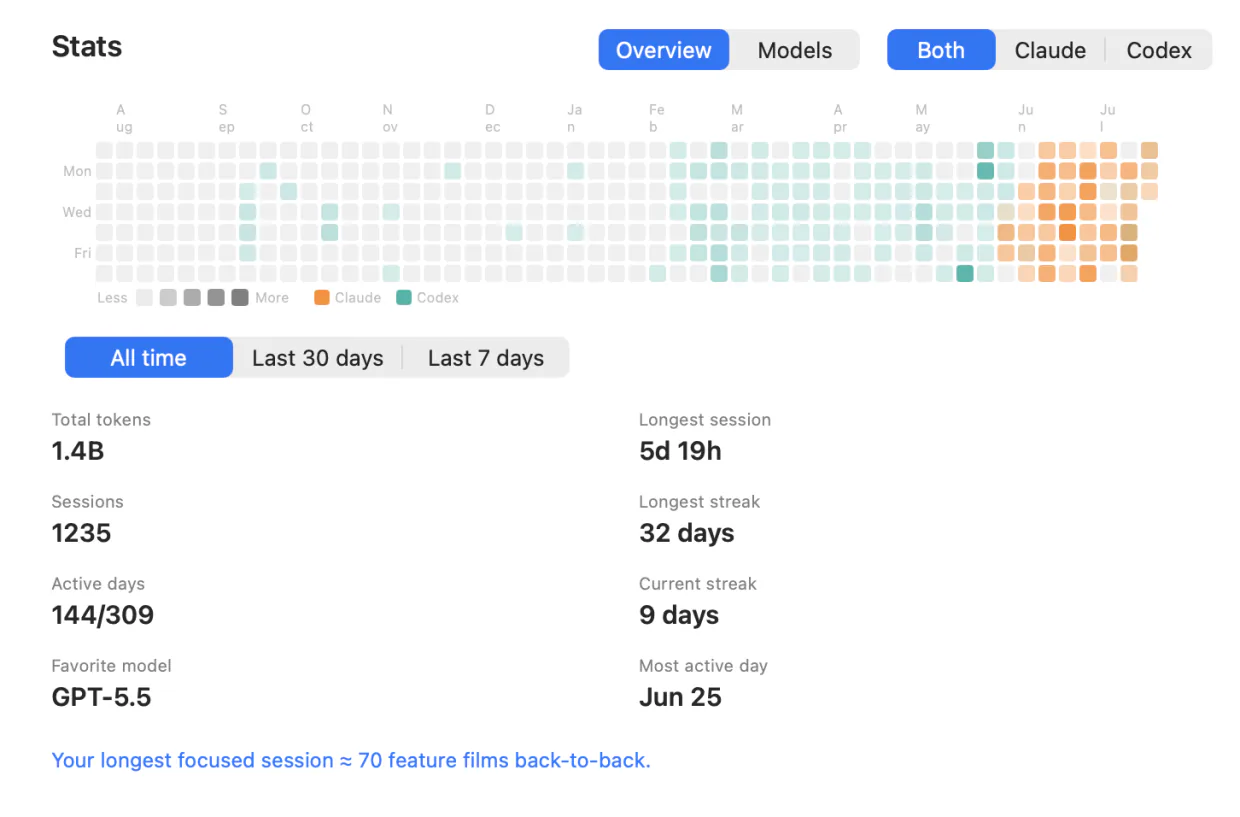
Sessions, streaks and a year of days
A contribution heatmap, current and longest streak, your longest session and busiest day, and token totals that OpenCode is actually able to fill in — down to the favourite model and the breakdown behind it. Filter to OpenCode alone, or read it against every other agent you run.
Built by reading OpenCode’s own session database on your Mac, so the history you had before installing Perch is counted too. Nothing is uploaded to produce it.
Pay once for the fleet. Subscribe for the conversation.
Solo
- Lifetime license — pay once, keep it
- One Mac at a time; deactivate in-app to move
- iOS companion, push alerts & Live Activities included
- Notarized app with signed automatic updates
Team
- A license key for every teammate — not one shared key
- Assign and revoke seats by email from your customer portal
- Your seat is claimed on purchase; invite the rest by email
- Same lifetime license and updates on every seat
- Perch Pro is separate — each teammate who wants it subscribes in the iPhone app
Pro
Most popularor $29 a year
Launch price until 15 November, then $49 a year
- A Mac app licence included, for as long as you subscribe — nothing separate to buy
- Read your agents’ conversations from your iPhone, and reply straight back into the session
- Works with your Mac locked, from anywhere your phone can reach it*
Free to download. Pro is an in-app purchase.
* What Pro can reach depends on the agent and on where its session is running. Replying needs the session inside tmux, herdr or Rex (Droid, tmux or Rex) — Codex in its default mode and OpenCode use their own local servers instead — and it has to be switched on in Settings, because paying for Pro is not the same as consenting to remote input. Reading a conversation works wherever the session runs. Each agent’s own page says exactly what it supports, and what it doesn’t.
Questions OpenCode users ask
Can I type a whole new message into an OpenCode session from my phone?
Do I have to configure anything?
My OpenCode sessions all say Idle after installing Perch. Why?
What does the plugin actually send?
Can I answer OpenCode's questions from my phone?
Where do the OpenCode usage bars come from?
Does it work with OpenCode over SSH?
Does Perch tell me when OpenCode has an update?
Why doesn't a new OpenCode window show up straight away?
Does my code leave my Mac?
Running Claude Code, Codex, Cursor, Devin, Amp, Antigravity, Droid or Muse Code too? Perch watches all 9 from one menu bar.