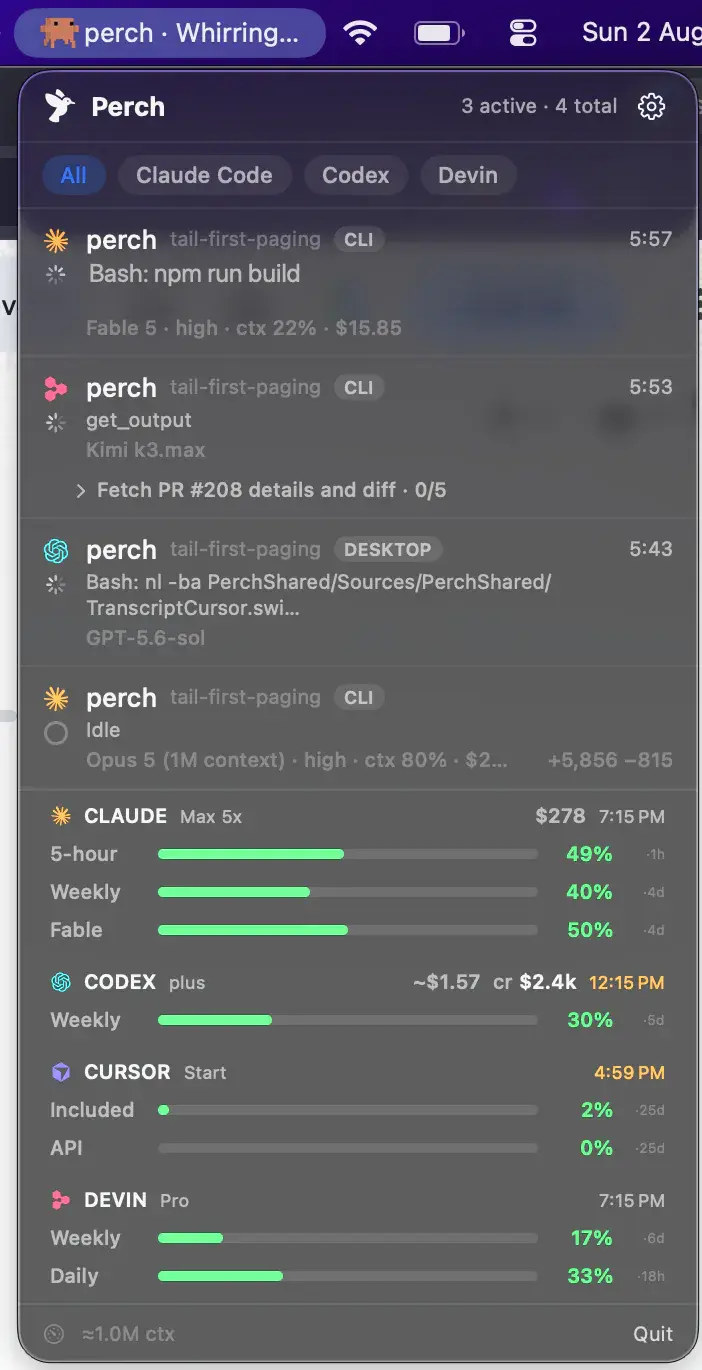
macOS menu bar · Amp
Perch sits in your menu bar and watches every Amp thread on your Mac — running, idle, or stopped waiting on your approval, read from Amp’s own state machine rather than guessed from a file’s timestamp. Type a reply straight back from your phone.

How it works
Ignored
Amp keeps a folder of thread JSON on disk, and it is dead — on a machine running Amp every day it had not been written to in four months, because threads sync to Amp's servers now. Reading it would resurrect long-finished sessions and present them as your fleet. Perch does not open it.
Scan
Discovery reads the CLI's structured logs instead — one file per thread. Their agent-state lines carry a real machine: working, streaming, running tools, compacting, idle. So an Amp row goes green because Amp said it was working, not because a file changed.
Plugin
Amp has no hook configuration to install into, but it does have plugins. Perch installs one it owns and can verify, which subscribes to Amp's thread state and reports the moment a thread stops for your approval — the state no log line ever carried.
The scan underneath needs nothing from you, and it stays there even with the plugin installed. If the plugin is removed, or Amp changes what it reports, Amp threads keep appearing with live running and idle state — you lose the waiting-on-approval row, not the fleet.
What lands on the row
Not inferred from file timestamps. An idle Amp that is still connected keeps receiving chatter that touches its log, so anything keyed on freshness would read every open Amp as permanently running. State comes from the last agent-state line and nothing else.
The plugin surfaces the approval state directly, so an Amp thread stopped for your decision says so on the row, on your phone and on your watch — instead of sitting there looking like it is still working.
The activity line names what Amp is doing right now, and the project it is doing it in, both read from the same stream as the state.
Amp names its threads, and Perch shows that name rather than the folder it runs in. Two Amp threads in one repository are finally told apart.
A live Amp holds its current thread's log open for writing, so the binding between a process and a thread is observed rather than guessed — the same kind of ground truth Perch uses for Devin.
An Amp stopped mid-turn leaves its log asserting it is still streaming, forever. Perch marks that ended. Calling it idle would read to the rest of the app as a turn that completed — and fire the completion sound and a finished notification for work that never finished.
Answering
An Amp thread running in tmux or herdr can be typed into from the iPhone app: a full message, line breaks and all, straight into Amp’s composer. Your Mac can stay locked — the text never goes through the keyboard or the screen, so nothing has to be awake to receive it.
Multi-line was not assumed. Every agent that accepts it was watched holding two lines unsubmitted before the feature was turned on, and Amp is one of the three also seen answering a two-line message as a single message rather than two.
Stop works for Claude Code, Codex and OpenCode. Amp is not on that list because its interrupt key was measured and it is not the key the others use — so the obvious implementation would send a keystroke that does something else to your thread.
That is a measurement, not a backlog item. The button appears when there is a key worth sending, and not before.
Usage
Amp does not publish your usage as data. Its internal API exposes exactly one usage-shaped call, and what comes back is a string: the server writes the sentence and the CLI prints it. So Perch reads English — the plan name, the named percentage meters inside it, and how many days until it renews.
The meter with the least left drives the headline bar, because there is no way to ask Amp which of its meters is the binding one. The rest appear as named windows beside it, so no figure is drawn twice.
Nothing. If the wording matches no shape Perch has actually captured, no strip is drawn at all — rather than a confident 0% that would read as an account about to run dry.
The countdown is day-granular because the sentence is. Perch will not render an hour it cannot see.
It reuses the credential the Amp CLI already stores, read-only, talks to one allow-listed host, fetches nothing unless an Amp session is on screen, and waits five minutes between fetches.
What it doesn’t do
Nothing Amp writes locally carries them. Measured, then measured again on a later research pass to check it had not changed.
Same reason. Amp’s CLI can report cost per thread, but Perch does not read it yet, so the row shows no dollar figure.
Perch’s Stats view is built on tokens and spend. With neither available for Amp, an Amp column would be an empty one — so Amp threads are watched live and left out of the history.
Perch can tell you an Amp thread is waiting on a decision, and you can type to it — but answering the approval itself from your phone is not built. Watching the request and brokering the answer are different jobs, and only the first is done.
An Amp thread goes from working to idle. Perch tells you the turn finished, but without the summary line it can show for agents that publish one.
Perch watches the Amp CLI. Amp inside an editor is not classified separately, and those threads are not discovered.
Every one of these is a measurement rather than a plan. Where Amp gains a way to publish a number, the number appears; until then the row stays empty instead of filled with a plausible guess. OpenCode is the other end of this spectrum, if you want to see what a fully instrumented provider looks like.
Pricing
One licence covers every agent Perch supports, not just Amp — and includes the iPhone companion and all future updates.
Prices in USD, tax included.
FAQ