Every Cursor session, at a glance.
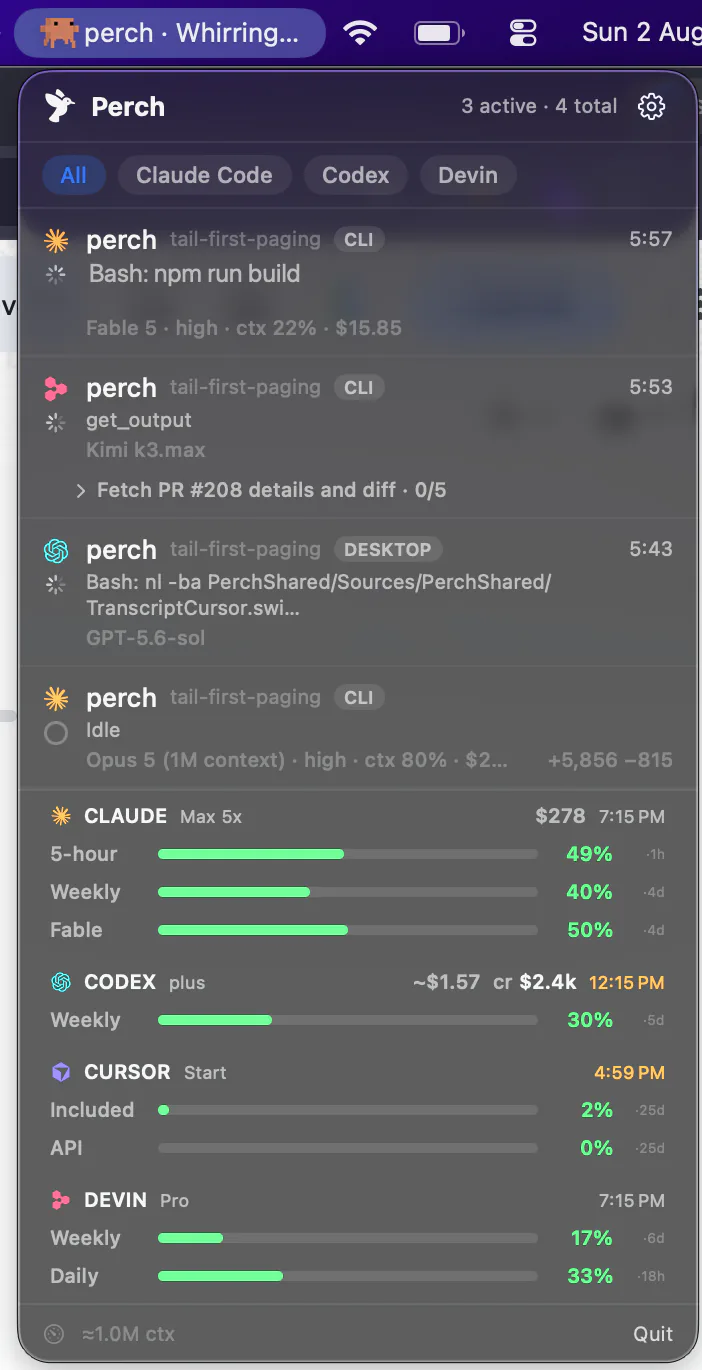
Perch sits in your menu bar and watches every Cursor session on your Mac — cursor-agent in a terminal and agents inside the IDE, from one install. Live state, the git branch each one is on, and how much of your plan you’ve used.
How it works
One hook install, both surfaces
One install
cursor-agent and the IDE, together
Perch writes a chain-safe hook into your Cursor config once, and it covers both surfaces — the cursor-agent CLI in a terminal and agent sessions inside Cursor itself. Perch labels which is which on every row, so a fleet of both reads clearly.
Liveness
A session that ends really ends
Neither of Cursor's end-of-session signals is reliable on its own, so Perch runs a watchdog alongside them and falls back to scanning Cursor's own chat records. The result is that finished sessions disappear instead of sitting there forever pretending to run.
Jump
Back to where it's running
One click on a CLI session lands in the exact terminal pane — Warp, iTerm2, Rex, Ghostty or Terminal.app. An IDE session raises Cursor itself: its deep links all create something new rather than focus a conversation that already exists, so there’s nothing honest to aim at yet.
Worktrees
Four sessions in one repo, and you can tell them apart
cursor-agent --worktree creates a worktree per session, which is a good way to work and a terrible thing to monitor: every row resolves to the same repository name and they render identically. Perch shows the git branch on each row, read live from the checkout itself, so parallel sessions are distinguishable at a glance.
perch mainRead: Views.swiftperch feat/usage-barsBash: swift testperch fix/watchdogEdit: Session.swiftRead from the repository rather than from Cursor, which reports no branch at all — so it stays correct when you switch mid-session, and works in worktrees, where the naive approach fails precisely where it matters most.
Sessions Perch used to miss
Sessions that outlive their terminal
agent persist, on the list
Cursor keeps these sessions running after you close the terminal. Each gets a row whether a terminal is attached or not, and with Perch Pro you can reply to one from your phone even while it’s detached.
Waiting for you to trust a folder
The first time you open Cursor somewhere new, it asks whether to trust the directory, and until you answered, the session was missing from Perch. It now reads “Waiting for you to trust this folder”.
Every project folder
Stats, the last reply and the conversation work for folders whose names have an underscore, a dot, a space or a double dash — Perch used to look for those transcripts in the wrong place. An idle row shows the conversation’s title again, too.
Usage
Included and API, on every screen you own
Both bars, plus the reset
Cursor bills on a billing cycle rather than rolling windows, so Perch shows your Included and API usage against that cycle, with the date it ends. Your plan label sits beside them.
There when Cursor isn’t
The reading is stored, so the bar survives quitting Cursor and relaunching Perch. It clears at the end of your billing period rather than guessing a zero for a period nothing has looked at.
On the phone and the watch
The same bars ride along to Perch Companion and the Apple Watch app, so you can check your remaining usage without opening the Mac.
Opt-in, and off by default
These are the only Cursor numbers that need your account, so they’re behind a switch. Everything else on this page works with it off.
What it doesn’t do
Cursor gives less away than the others. Here’s where
Perch was built against Claude Code first, and not everything ports. Rather than let you find these out after paying:
No remote approvals
Cursor has no event that means “asking a human”, so there is no “needs you” state to send anywhere. Wiring it to the hook that does exist would alert you on every auto-approved command. Claude Code, Codex, OpenCode, Devin, Droid and Muse Code have this; Cursor doesn’t. Typing a reply from your phone is a separate route and does work — it needs no permission event.
No token totals in Stats
Cursor doesn’t persist per-turn counts, so nothing can total them after the fact. You still get sessions, active days, streaks and the heatmap.
No per-session cost
Deferred, not impossible — under Auto there’s no model name to price against, and a made-up number is worse than a blank.
Delegates sit side by side
Cursor never fires its own subagent hooks, so background work shows as sibling rows rather than nested under its parent.
No per-model breakdown
Under Auto, Cursor reports its model as “default”, so there’s no model name to attribute a session to and nothing for a breakdown to split.
Everything else is there
Live state, the CURSOR badge on Mac and phone, git branch, jump-to-session, usage, streaks and the heatmap, launch at login, and the same one-time license.
Stats
Sessions, streaks and a year of days
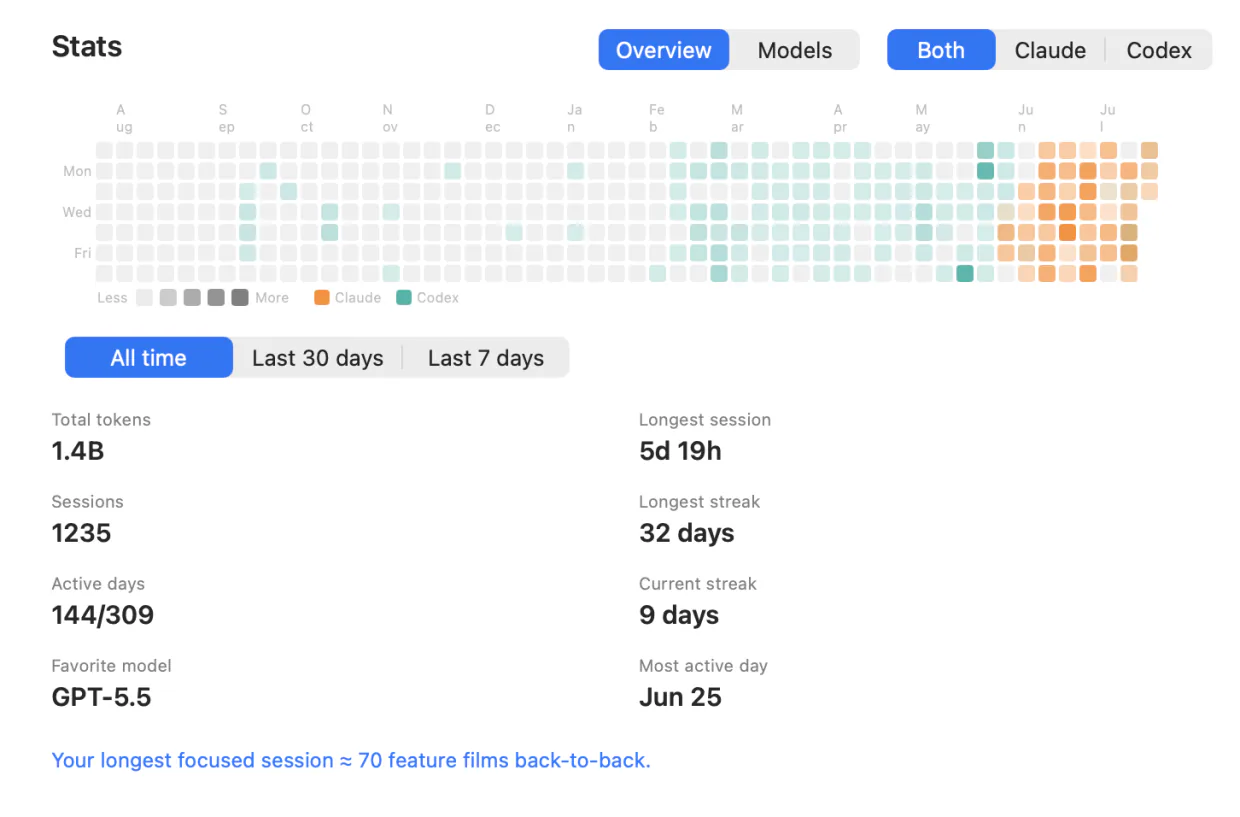
A contribution heatmap, current and longest streak, your longest session and busiest day, and a running count of sessions and active days. Filter to Cursor alone, or set it against every other agent you run.
Pay once for the fleet. Subscribe for the conversation.
Solo
- Lifetime license — pay once, keep it
- One Mac at a time; deactivate in-app to move
- iOS companion, push alerts & Live Activities included
- Notarized app with signed automatic updates
Team
- A license key for every teammate — not one shared key
- Assign and revoke seats by email from your customer portal
- Your seat is claimed on purchase; invite the rest by email
- Same lifetime license and updates on every seat
- Perch Pro is separate — each teammate who wants it subscribes in the iPhone app
Pro
Most popularor $29 a year
Launch price until 15 November, then $49 a year
- A Mac app licence included, for as long as you subscribe — nothing separate to buy
- Read your agents’ conversations from your iPhone, and reply straight back into the session
- Works with your Mac locked, from anywhere your phone can reach it*
Free to download. Pro is an in-app purchase.
* What Pro can reach depends on the agent and on where its session is running. Replying needs the session inside tmux, herdr or Rex (Droid, tmux or Rex) — Codex in its default mode and OpenCode use their own local servers instead — and it has to be switched on in Settings, because paying for Pro is not the same as consenting to remote input. Reading a conversation works wherever the session runs. Each agent’s own page says exactly what it supports, and what it doesn’t.
Questions Cursor users ask
Can I reply to a Cursor session from my phone?
Can I approve Cursor permission prompts from my phone?
What does the row say when I stop a turn with Ctrl+C?
I've moved Cursor's config folder. Does live status still work?
Does it work with the Cursor IDE or only the CLI?
Why does Stats show sessions and days for Cursor but no tokens?
Is there a per-session cost figure for Cursor?
Do the usage bars need my Cursor login?
Does my code leave my Mac?
Running Claude Code, Codex, Devin, OpenCode, Amp, Antigravity, Droid or Muse Code too? Perch watches all 9 from one menu bar.