Every Devin session, at a glance.
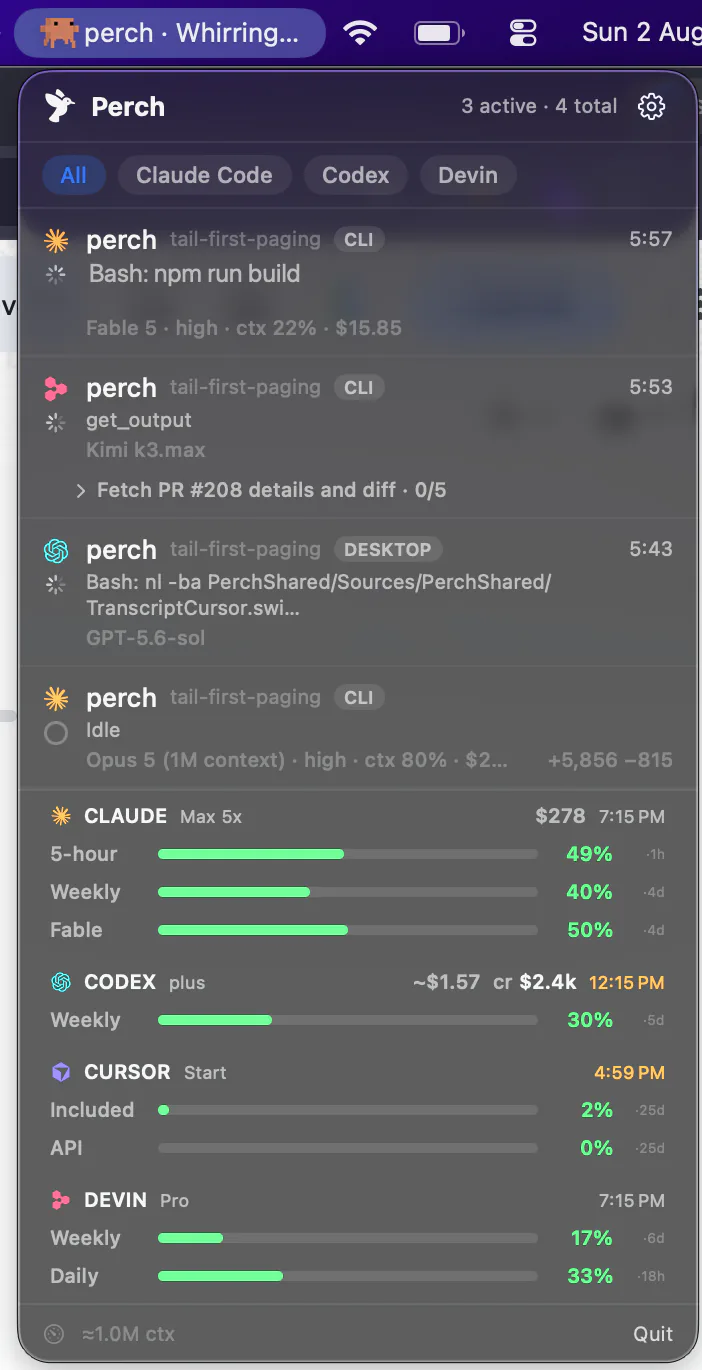
Perch sits in your menu bar and watches every Devin CLI session on your Mac — whether it’s working or waiting on you, which model it routed to, and how far through its checklist it is. When Devin asks to run a command, Allow or Deny it from your phone or your wrist.
How it works
Zero setup, and a row that actually moves
Nothing to set up
It reads what Devin already keeps
Perch finds your sessions in Devin's own records on this Mac — no account to connect, no setting to switch on, and nothing of Devin's is modified to make discovery work. Sessions you ran before installing Perch are there too.
Live turn state
Working, and back to idle
A small reporter tells Perch when a turn starts and ends, so a Devin row goes to work and back rather than sitting at idle the whole time. It names the tool it's running and reads its to-do list as items get ticked off.
One finish per turn
No premature “done”
When a Devin turn delegates, it announces the end of the turn twice — the first time while the agent is still working. Taken at face value that fires a finished alert to your phone mid-run, so Perch tracks the outstanding delegation and lets only the real one through.
Devin routes across many model families rather than serving one, so which model a session is actually on is a real question with a different answer each time. Perch puts it on the row, under the name Devin itself uses.
Approvals
Allow or Deny Devin from your phone
On the phone, the watch and the Mac
When Devin asks permission to run a command, the row turns amber and the request reaches your iPhone, your Apple Watch and a Mac notification at once. Your answer goes back to Devin.
The whole command
Every line of it, up to 4 KB, with hidden characters shown as codes, on the Mac, the phone and the watch alike. One too long for the alert gets no one-tap Allow.
Devin’s dialog, if you don’t answer
While approvals are on, Devin waits up to 45 seconds for your answer. Leave it and Devin shows its own dialog in the terminal, as it would without Perch. Nothing is approved for you.
Included with the one-time licence. How approving from your iPhone works.
Your config
The installer that checks its own work
Devin’s config file isn’t a hooks file. It holds your whole setup — your permissions, your MCP servers, your model choice. And its parser is all-or-nothing: a single event name it doesn’t recognise and it throws away the entire file rather than skipping the line it disliked.
So a careless write here doesn’t degrade Perch. It breaks Devin. Perch registers only the seven events it has watched fire on a real machine — not the larger list Devin’s parser would accept — then reads the file back after writing and puts your backup back if what it reads doesn’t verify.
None of Perch’s other installers do that read-back, because no other agent punishes a bad write this way. Removing the integration takes the entry out and leaves everything around it exactly as it was.
Registered
SessionStartUserPromptSubmitPreToolUsePostToolUseStopSessionEndPermissionRequestAccepted, but never observed firing
PostCompactionAdding it “for symmetry” would risk your whole config for a capability nobody has proven exists. PermissionRequest sat here until Devin started firing it, and was added once it had been watched.
Usage
Daily and weekly quota, and the plan you’re on
Both windows, as bars
Devin meters a daily and a weekly quota rather than the rolling windows other agents use. Both sit in the same strip as your other agents’ limits, with your plan name beside them.
Used, not remaining
Devin reports what you have left; every other bar in Perch shows what you’ve spent. Perch converts it, so you’re not reading one bar backwards against four others.
Its own login, untouched
Perch uses the credential Devin already stored here and never modifies it — and sends it only to one allow-listed host, never to the server address that same editable file happens to name.
On the phone and the watch
The same bars ride along to Perch Companion and the Apple Watch app, so you can check what’s left without opening the Mac.
What it doesn’t do
Devin says less about itself than the others. Here’s all of it
This is the longest list on any of these pages, and every item on it was measured against a running Devin rather than assumed. Better here than discovered after paying:
No Stop from your phone
Devin’s interrupt takes two presses of Escape, and a stray one at an idle prompt opens a menu that can undo work. Perch would rather show no button than one that can destroy a turn.
No live token count
The transcript isn’t written until the session exits, so while a row is on screen there is nothing on disk to read. The numbers don’t exist yet rather than being withheld.
Stats arrive on exit
Same reason. A Devin session joins the heatmap and the totals when it ends, not while it runs — and the first scan after installing backfills everything you ran before.
No per-session cost
Devin’s local records carry a cost column that reads zero; the real figure appears to be worked out server-side. Rather than print a zero that looks like a fact, Perch leaves it blank.
Warned on both quotas
Both bars are shown, and the low-usage warning watches the daily allowance as well as the weekly one. Daily is usually the one that runs out first.
CLI only
The Devin IDE is a separate, uninstrumented surface. Assuming one install covers both is how bugs have shipped here before, so it’s carried as unknown rather than claimed.
Everything else is there: live state, the checklist, the model, Allow and Deny from your phone and watch, Devin’s own mark on every row across Mac, phone and watch, jump-to-session, the finished notification (Devin gives no summary to put in it), quota bars, streaks and the heatmap, launch at login, and the same one-time license.
Stats
Sessions, streaks and a year of days
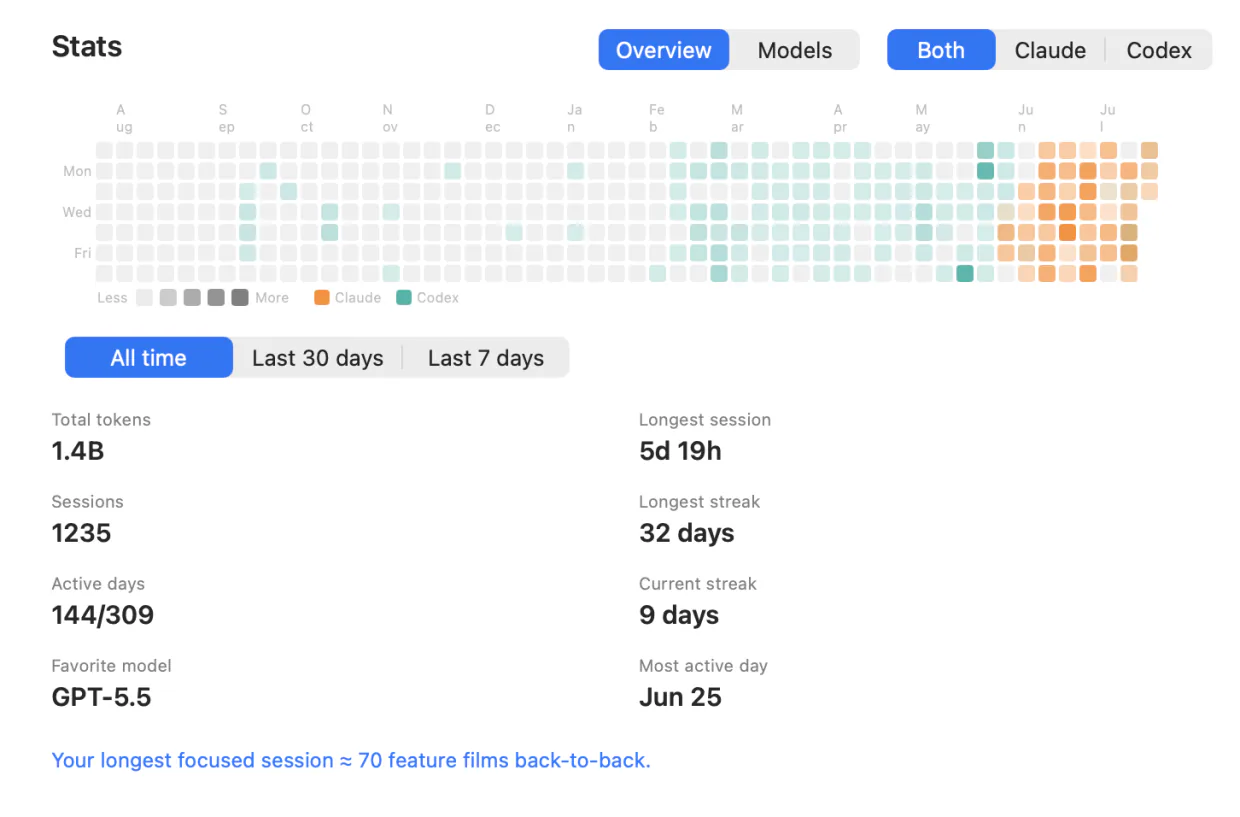
A contribution heatmap, current and longest streak, your longest session and busiest day, token totals and the model you reach for most. Filter to Devin alone, or read it against every other agent you run.
The first scan after installing reads your past Devin sessions in, so all-time totals jump and older days in the heatmap darken. It’s built from your own files on your own Mac — nothing is uploaded to produce it.
Pay once for the fleet. Subscribe for the conversation.
Solo
- Lifetime license — pay once, keep it
- One Mac at a time; deactivate in-app to move
- iOS companion, push alerts & Live Activities included
- Notarized app with signed automatic updates
Team
- A license key for every teammate — not one shared key
- Assign and revoke seats by email from your customer portal
- Your seat is claimed on purchase; invite the rest by email
- Same lifetime license and updates on every seat
- Perch Pro is separate — each teammate who wants it subscribes in the iPhone app
Pro
Most popularor $29 a year
Launch price until 15 November, then $49 a year
- A Mac app licence included, for as long as you subscribe — nothing separate to buy
- Read your agents’ conversations from your iPhone, and reply straight back into the session
- Works with your Mac locked, from anywhere your phone can reach it*
Free to download. Pro is an in-app purchase.
* What Pro can reach depends on the agent and on where its session is running. Replying needs the session inside tmux, herdr or Rex (Droid, tmux or Rex) — Codex in its default mode and OpenCode use their own local servers instead — and it has to be switched on in Settings, because paying for Pro is not the same as consenting to remote input. Reading a conversation works wherever the session runs. Each agent’s own page says exactly what it supports, and what it doesn’t.
Questions Devin users ask
Can I reply to a Devin session from my phone?
Do I need to set anything up?
Can I approve Devin permission prompts from my phone?
Why is there no token count on my running Devin session?
Will installing Perch break my Devin configuration?
Does it work with the Devin IDE, or only the CLI?
Where do the Devin usage bars come from?
Does Perch tell me when Devin is down?
Does my code leave my Mac?
Running Claude Code, Codex, Cursor, OpenCode, Amp, Antigravity, Droid or Muse Code too? Perch watches all 9 from one menu bar.