Every Codex session, at a glance.
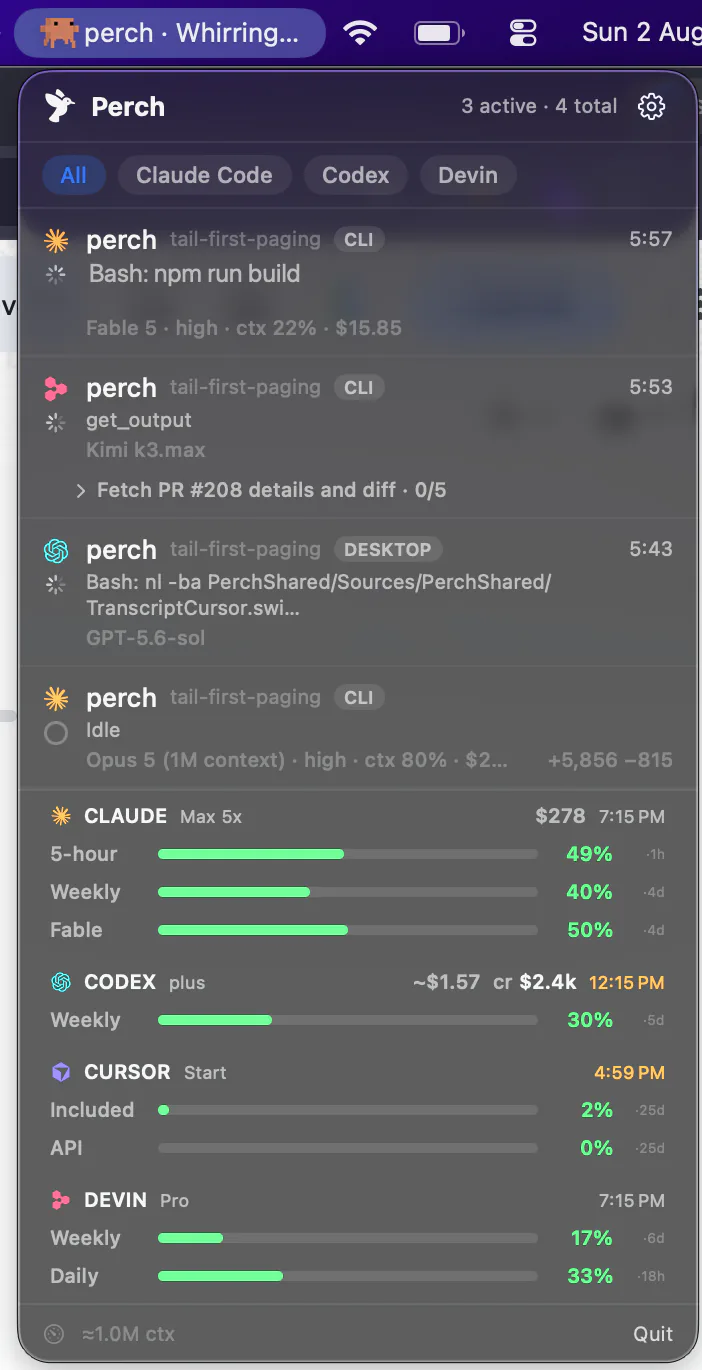
Perch sits in your menu bar and watches every Codex session on your Mac — the CLI and Codex Desktop both. It shows what each one is doing, how much of your rate limit is left, and taps you on the shoulder when one needs a decision.
How it works
Useful before you configure anything, live once you do
Two paths feed Codex support, and they degrade gracefully: if the hook half never gets set up, the scan half still carries the panel.
Rollout scan
Nothing to install to see something
Perch reads your Codex rollouts straight from ~/.codex, so the panel is populated the moment you launch it — including sessions that were already running. No hook, no config, no setup step between installing Perch and seeing your fleet.
Hooks
codex-report, for the live half
The hook is what turns a rollout history into a live view: state the instant it changes, a “needs you” the moment Codex asks, and Allow/Deny from the notification. Perch writes it into ~/.codex/hooks.json itself and chains onto hooks you already run.
Codex Desktop
Straight to the conversation
Codex is the one agent Perch can open by conversation rather than by window: a codex://threads link lands on the exact thread inside the desktop app. CLI sessions land in the exact terminal pane instead.
Hook trust
Codex won’t run a hook you haven’t trusted. Perch says so out loud
Codex requires every non-managed hook to be reviewed and trusted by hash before it will execute. Install an integration, change nothing else, and it sits there looking enabled while doing precisely nothing — no state changes, no alerts, no approvals. We know because it happened to us: on a live machine, none of Perch’s eight Codex hooks were trusted, and the integration read as on the whole time.
So Perch asks Codex directly which hooks it will actually run, and surfaces anything untrusted or stale-hashed in Settings with the fix attached. A silent no-op is the worst failure a menu bar app can have — you stop looking at it and never find out why.
What lands on the row
What Codex did, in plain words
Finished, with what it said
The “finished” notification shows the first line of Codex’s reply, rather than a bare “Codex finished its turn”. While it works, the row keeps the tool it’s running — “exec: npm test” — and the timer, for the whole of a long command.
Limits and errors, named
A turn that stops because you ran out of usage reads “Rate limited” and sends the rate-limit alert, not a “finished”. A turn that stops on any other error names the problem on the row.
Costs at current prices
Priced against OpenAI’s published list, GPT-6 and GPT-5.6 included, and each part of a session at the model that did it, so switching models doesn’t re-price what came before. Work on a model with no published price makes the figure end in “+”; if none of it can be priced, it reads “~$?” instead of looking free.
Sessions that stay on the list
A session in Codex’s background service stays for as long as its terminal is open, instead of dropping off after half an hour idle, and takes replies and Stop from your phone through that service, whatever terminal it’s in. Codex Desktop’s own short background threads no longer show up as extra rows.
Usage, limits and spend
Everything your account will tell you, on one strip
Credit balance
Your extra-usage credits, right beside the limit bars — so when the included allowance runs out you can see what’s left to spend instead of guessing.
Your plan, without a login
Codex reports your plan directly, so Perch can label it with no OAuth grant and no credential handling at all. It’s just there.
Rate-limit windows as bars
Both limit windows with their reset times, as a countdown or a clock. Perch warns you under ten percent and surfaces a rate limit the moment you hit one — on the Mac and as a push.
Per-model weekly bars
Opt in with a read-only OAuth grant and each model gets its own bar. Off by default, and everything above works without it.
Per-session cost is an estimate, derived from token counts, and Perch labels it as one rather than passing it off as a billed figure. Two things Codex doesn’t expose at all: lines changed per session, and a heads-up when a plan is ready for review.
Stats
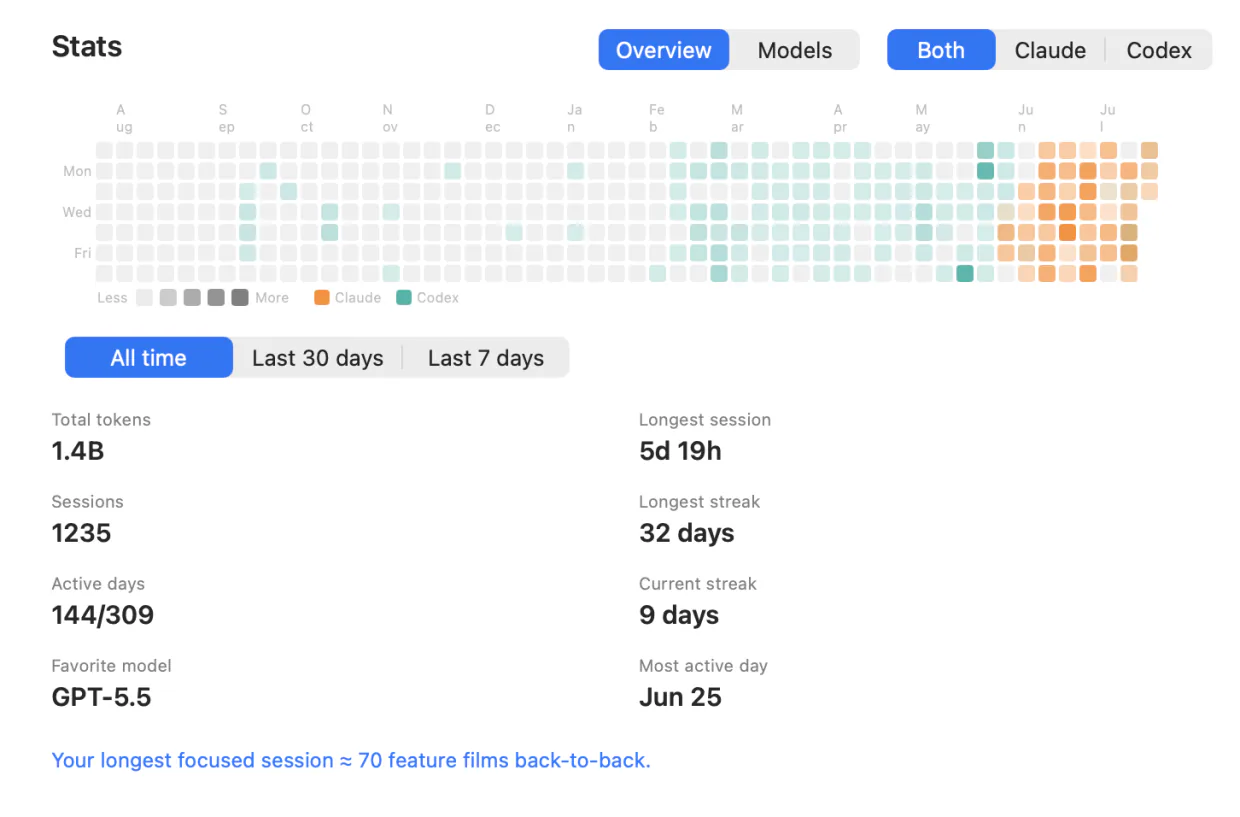
A year of Codex, in one panel
Total tokens, sessions and active days; a contribution heatmap; current and longest streak; your longest session and busiest day; your favourite model and a full per-model breakdown. Filter to Codex alone, or set it against the other agents you run.
Codex sessions carry through to the iPhone and Apple Watch too — the fleet view, push alerts, Live Activities, and Allow/Deny from the notification on your phone or from your wrist.
Pay once for the fleet. Subscribe for the conversation.
Solo
- Lifetime license — pay once, keep it
- One Mac at a time; deactivate in-app to move
- iOS companion, push alerts & Live Activities included
- Notarized app with signed automatic updates
Team
- A license key for every teammate — not one shared key
- Assign and revoke seats by email from your customer portal
- Your seat is claimed on purchase; invite the rest by email
- Same lifetime license and updates on every seat
- Perch Pro is separate — each teammate who wants it subscribes in the iPhone app
Pro
Most popularor $29 a year
Launch price until 15 November, then $49 a year
- A Mac app licence included, for as long as you subscribe — nothing separate to buy
- Read your agents’ conversations from your iPhone, and reply straight back into the session
- Works with your Mac locked, from anywhere your phone can reach it*
Free to download. Pro is an in-app purchase.
* What Pro can reach depends on the agent and on where its session is running. Replying needs the session inside tmux, herdr or Rex (Droid, tmux or Rex) — Codex in its default mode and OpenCode use their own local servers instead — and it has to be switched on in Settings, because paying for Pro is not the same as consenting to remote input. Reading a conversation works wherever the session runs. Each agent’s own page says exactly what it supports, and what it doesn’t.
Questions Codex users ask
Can I reply to a Codex session from my phone?
Why did Perch tell me my Codex hooks aren't trusted?
What still works if I never trust the hooks?
Do I have to edit ~/.codex/hooks.json myself?
Does it work with Codex Desktop as well as the CLI?
Is the cost figure exact?
Why does a Codex row say “hooks unconfirmed”?
Does it work with Codex's background service?
Does Perch tell me when Codex is down, or out of date?
Does my code leave my Mac?
Running Claude Code, Cursor, Devin, OpenCode, Amp, Antigravity, Droid or Muse Code too? Perch watches all 9 from one menu bar.