Every Claude Code session, at a glance.
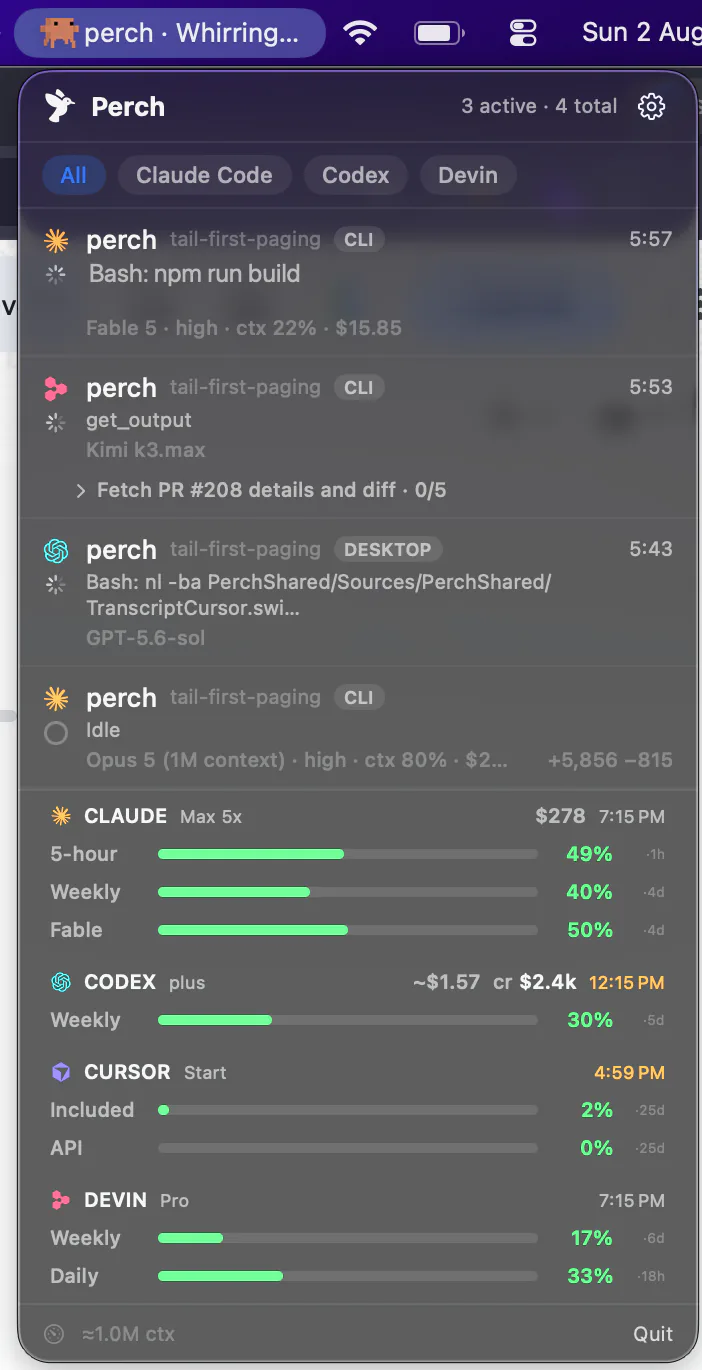
Perch sits in your menu bar and watches every Claude Code session on your Mac — CLI, Claude Desktop, and the terminal inside your editor. When one stops for a permission prompt, it taps you on the shoulder, and you approve it from the menu bar, your iPhone, or your wrist.
How it works
Three ways in, none of them a config file you edit
Claude Code exposes more about a running session than any other agent Perch supports, and Perch reads all of it.
Hooks
perch-report, installed for you
Perch writes its hooks into your Claude Code settings itself — no config to edit, and chain-safe, so hooks you already have keep firing. State changes land the instant they happen: starting, running, waiting on you, done. Remove them from Settings and nothing of Perch is left behind.
Status line
Your context and cost, read at the source
Perch can install a Claude Code status line, and chains to an existing one rather than replacing it. That's where per-session context and exact spend come from — the same numbers Claude Code itself reports, not an estimate reconstructed from token counts.
Transcript scan
Sessions that started before Perch did
A scan of ~/.claude/projects picks up work already in flight the moment you launch Perch, so the first thing you see is your actual fleet rather than an empty panel waiting for the next hook to fire.
Approvals
The prompt finds you, wherever you are
Allow or deny, from anywhere
A permission prompt reaches the menu bar, your iPhone and your Apple Watch at once. On the phone, Allow and Deny are on the alert itself — Face ID, one tap — and the session moves on. No hunting for which terminal it was.
The whole command, every line
The Mac notification, your phone and your watch show the full command, up to 4 KB, with hidden characters that could disguise it shown as codes. One too long for the alert gets no one-tap Allow.
Questions, answered by choice
When Claude asks a multiple-choice question, pick the answer in Perch’s question sheet, or with a tap on your iPhone or watch. There’s no typed reply there on purpose: Claude’s menu would take the highlighted option, not your words.
Subagents count as working
Perch tracks nested subagents, so a session that has handed off to background work stays running instead of going falsely idle — and the “finished” ping lands when the work is really done.
The checklist, tracked
Perch reads Claude’s own to-do list, so a long run reads as “task 4 of 5” with the current step named — on the Mac, and on your lock screen as a Live Activity.
Stale prompts stand down
If you answered in the terminal yourself, Perch notices and drops the “needs you” state rather than nagging about a decision you already made.
Straight to the session
One click on a CLI session lands in the exact pane it’s running in — Warp, iTerm2, Rex, Ghostty or Terminal.app. Claude Desktop sessions raise the app.
Allow, and stop asking
When Claude suggests a rule with its prompt, a third button saves it: allow this, and don’t ask again. The button names the rule and where it goes — “Bash(sw_vers) in this project” — and it is exactly the rule the terminal’s own option would save, nowhere wider.
How approving Claude Code from your iPhone works, step by step — and every alert Perch can send you.
What lands on the row
Everything worth knowing, on one line
Its name, and its pull request
A name set with /rename or --name, or the title Claude writes, becomes the row’s title, even when it changes mid-session. If the branch has an open pull request, the row shows its review state — “PR #1234 approved” — read from the status line Perch sets up.
The mode it runs in
Auto, manual, plan, accept edits or bypass, next to the model and context — so a session that never stops to ask isn’t a mystery. A session in fast mode says “fast”, and a model change shows straight away.
When the next message costs more
Claude keeps a conversation cached for about an hour. Once a session has sat longer than that, idle or waiting on you, the row reads “cache cold · 39k to rebuild”: your next message pays to rebuild it.
What it’s actually doing
“Compacting context…” while it compacts, a tool auto mode refused shown as blocked, a failed tool shown as failed, and an MCP tool as “github - create_pull_request (MCP)” rather than its raw id.
An error isn’t a finish
A turn that stops on a rate limit, a server error or being signed out names the problem instead of chiming “finished”. One that ends with background commands still running shows “1 background task”, and the finished alert waits for them.
Folders you haven’t trusted yet
Claude runs no hooks in a folder until you accept its trust prompt, so the row used to look broken. It now reads “Waiting for you to trust this folder”, and turns into a normal row once you accept.
Usage, limits and spend
Know how much runway is left, before you hit the wall
5-hour and weekly windows
Both limit windows as progress bars, with the reset time beside each — as a countdown or a clock, whichever you prefer. They read from the provider, so they keep moving while a session sits idle.
Per-model weekly bars
Opt in with a read-only OAuth grant and each model gets its own bar, so you can see which one is eating the week. Off by default, and everything else works without it.
Exact cost, not an estimate
Per-session spend and today’s total come from Claude Code’s own reporting rather than a token-count reconstruction — the figure Perch shows is the figure you pay.
A warning before you run out
Perch tells you when a window drops under ten percent, and surfaces a rate limit the moment you hit one — on the Mac and as a push to your phone.
Stats
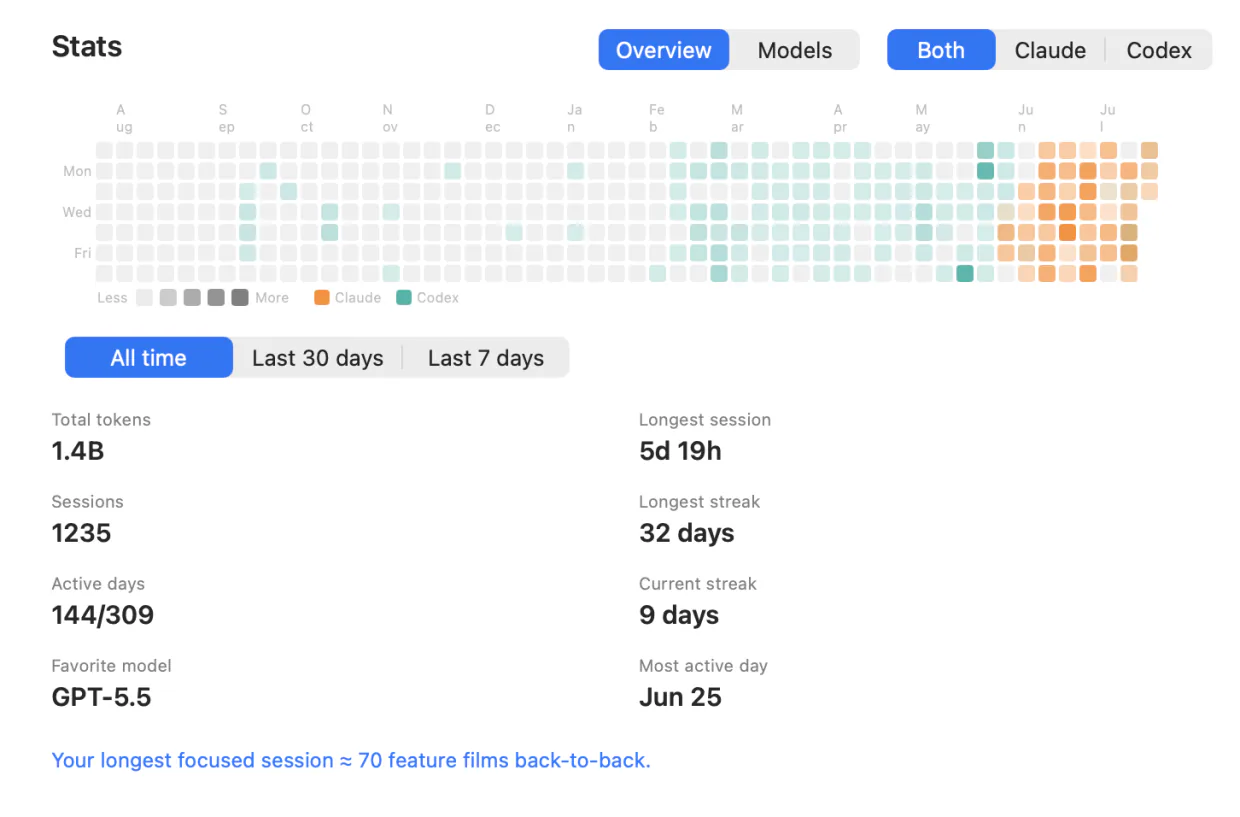
A year of Claude Code, in one panel
Total tokens, sessions and active days; a contribution heatmap; current and longest streak; your longest session and busiest day; your favourite model and a full per-model breakdown. Filter to Claude alone, or set it against the other agents you run.
The Mac computes a digest and sends it on, so the same numbers are on your iPhone and your Apple Watch.
Pay once for the fleet. Subscribe for the conversation.
Solo
- Lifetime license — pay once, keep it
- One Mac at a time; deactivate in-app to move
- iOS companion, push alerts & Live Activities included
- Notarized app with signed automatic updates
Team
- A license key for every teammate — not one shared key
- Assign and revoke seats by email from your customer portal
- Your seat is claimed on purchase; invite the rest by email
- Same lifetime license and updates on every seat
- Perch Pro is separate — each teammate who wants it subscribes in the iPhone app
Pro
Most popularor $29 a year
Launch price until 15 November, then $49 a year
- A Mac app licence included, for as long as you subscribe — nothing separate to buy
- Read your agents’ conversations from your iPhone, and reply straight back into the session
- Works with your Mac locked, from anywhere your phone can reach it*
Free to download. Pro is an in-app purchase.
* What Pro can reach depends on the agent and on where its session is running. Replying needs the session inside tmux, herdr or Rex (Droid, tmux or Rex) — Codex in its default mode and OpenCode use their own local servers instead — and it has to be switched on in Settings, because paying for Pro is not the same as consenting to remote input. Reading a conversation works wherever the session runs. Each agent’s own page says exactly what it supports, and what it doesn’t.
Questions Claude Code users ask
Do I have to edit my Claude Code settings by hand?
Will it clobber my status line?
Does it work with Claude Desktop, or only the CLI?
Can it slow Claude Code down?
Where do the weekly per-model bars come from?
Does Perch see Claude's background sessions?
Can Perch watch two Claude accounts?
What if I start Claude with --bare?
Does Perch tell me when Claude Code is down, or out of date?
Does my code leave my Mac?
Running Codex, Cursor, Devin, OpenCode, Amp, Antigravity, Droid or Muse Code too? Perch watches all 9 from one menu bar.