A guide to agent notifications on your Mac
Know the moment Claude Code needs you.
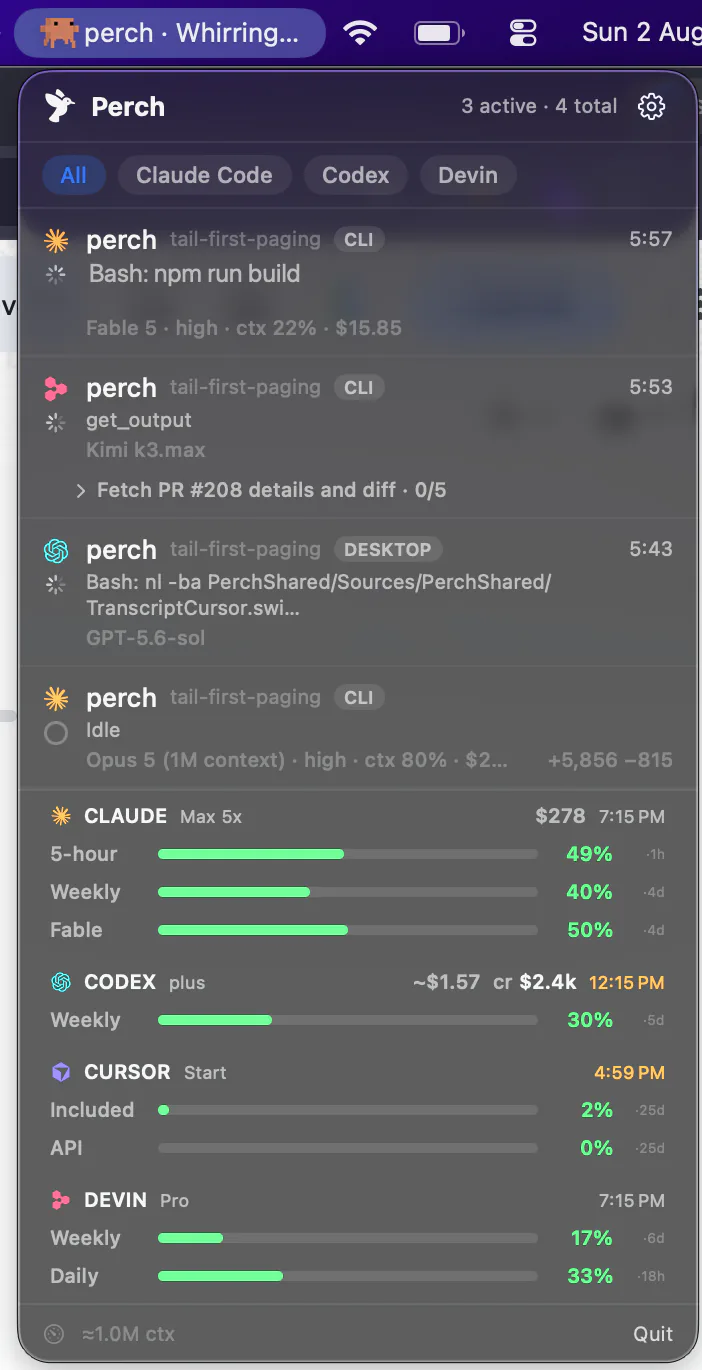
Perch watches every Claude Code session on your Mac and tells you the moment one stops for a permission or a question — in the menu bar, as a notification you can answer, and on your iPhone and Apple Watch. It does the same for Codex, OpenCode and the other agents you run.
- One-time $29
- Nothing to configure
- macOS 13 or later
Four alerts, each one a switch
Named here as they are in Perch’s Settings → Notifications, where each can be turned on or off on its own.
“When an agent needs you”
A session stopped at a permission prompt or asked you a question. The notification says what it's waiting on — the command it wants to run, or the question itself.
“When an agent finishes”
A turn is done. Where the agent writes a closing reply, the notification carries its first line, so you know whether to look now or later.
“On rate limit”
The moment a session hits a usage limit, rather than a quiet stall you only notice when you come back.
“When usage runs low (<10% left)”
A heads-up when one of your plan's windows is nearly spent, before a long run stops halfway.
Where you’ll see it
In the menu bar
The session’s row turns amber and the menu bar says how many are waiting — “1 waiting for you” — so you can see it from across the room without opening anything.
As a Mac notification
Click it and you land inside the session, not just the app: the exact pane in Warp and iTerm2, the exact split in Ghostty, the exact tab in Terminal.app.
As a sound
Optional, for when a turn finishes — so you can look away from the screen entirely while a long run works.
Answered in place
Allow and Deny on the notification itself, or a typed answer to a question. Perch checks the agent is still there before typing, and puts the text in the session’s own pane.
On your iPhone
A push with Allow and Deny on it, and a Live Activity counting down how long you have. How approving from your iPhone works.
On your wrist
A tap when a new session needs you, and a watch-face timer for how long the top one has waited.
Which agent sends which alert
Each agent tells Perch a different amount about itself. A dash means Perch hasn’t measured that alert for that agent yet — not that it can’t be done.
| Agent | Needs you | Finished | Rate limit | Usage low |
|---|---|---|---|---|
| Claude Code | Needs youYes | FinishedWith the reply | Rate limitYes | Usage lowYes |
| Codex | Needs youYes | FinishedWith the reply | Rate limitYes | Usage lowYes |
| OpenCode | Needs youYes | FinishedWith the reply | Rate limitYes | Usage lowYes, Go plan |
| Droid | Needs youYes | FinishedWith the reply | Rate limit— | Usage low— |
| Amp | Needs youYes | FinishedYes | Rate limit— | Usage lowYes |
| Antigravity CLI | Needs youYes | FinishedYes | Rate limit— | Usage lowYes |
| Cursor | Needs youNo | FinishedWith the reply | Rate limitNo | Usage lowYes, opt-in |
| Devin | Needs youNo | FinishedYes | Rate limit— | Usage lowYes |
| Muse Code | Needs youNot yet | FinishedWith the reply | Rate limit— | Usage low— |
Fewer false alarms
An alert you learn to ignore is worse than none. Most of Perch’s work on notifications has gone into the ones it doesn’t send.
An error isn’t a finish
A Claude Code or Codex turn that stops on a rate limit or an error names the problem instead of chiming “finished”.
Background work counts
While subagents or background commands are still running, the session stays working, and the finished alert waits for them.
Answered at the terminal
Choose Yes in the terminal yourself and Perch clears the request everywhere, instead of leaving it waiting on your phone.
Cancelled isn’t finished
In Claude Code, Antigravity and Droid, a turn you stopped with Escape goes quiet. Only a turn that really completed gets announced.
Set it up
1
Install Perch on your Mac
macOS 13 or later. It finds the agents you have and installs its own hooks into each one — there's no config file to edit.
2
Allow notifications
When macOS asks whether Perch may send notifications, say yes. Then choose which alerts you want in Perch's Settings → Notifications, and whether a sound plays when an agent finishes.
3
Restart sessions that were already open
An agent reads its hooks when it starts, so a session that was running before Perch installed them shows “Restart to enable live updates” on its row. Start it again and it reports straight away.
4
Add your phone, if you like
Pair Perch Companion on your iPhone and the same alerts reach your pocket and your wrist — with Allow and Deny on them.
Doing it yourself
Claude Code can run a command of your own when it needs input, and a short hook script that posts a macOS notification is a fine answer for one agent. Some terminals, Warp among them, also alert you for Claude Code sessions running inside them.
Perch is for when that stops being enough: several agents at once, the menu bar telling you which one is waiting, a click that lands in the right pane, alerts that know an error from a finish, and the same thing on your phone and your wrist.
Questions