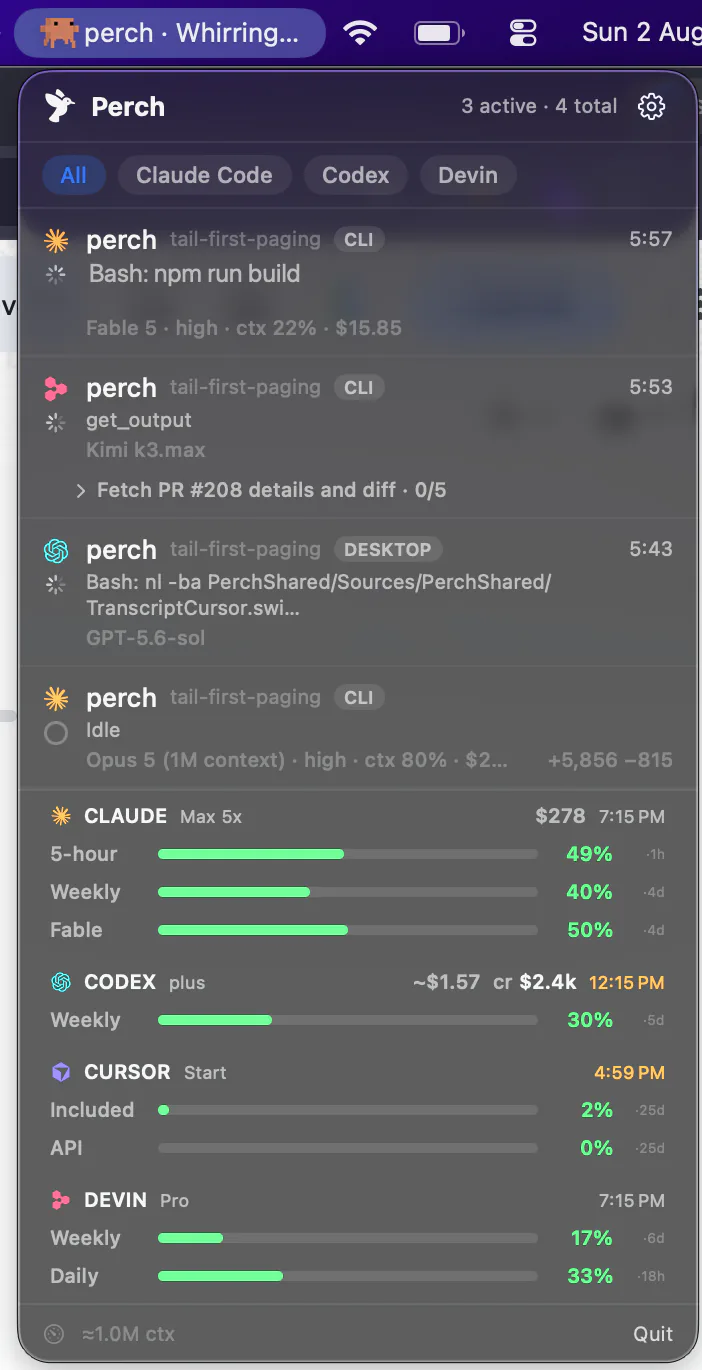
macOS menu bar · Antigravity CLI
Perch sits in your menu bar and watches every agy session on your Mac — running, waiting on a permission or a question, or finished — read from the status line the CLI already redraws, with the model, the context window and both of your weekly quotas. Add Perch Pro to read the conversation, reply, and stop a turn from your phone.
Antigravity CLI is what Gemini CLI became: the agy binary Google moved individual accounts to in June 2026.

How it works
Scan
Antigravity keeps each conversation in its own SQLite file, and two integers inside it are the state: generating, waiting on you, running a tool, done. So a session started before Perch was installed still shows up, with the right state — and this is the only channel that can see a pending question, which the status line never reports.
Status line
The CLI runs a command on every state change and about three times a second while it works. Perch registers its own reporter in that slot — stacked under Antigravity's own line, or chained ahead of one you already had — and reads the model, context usage, working folder, quota and whether a tool is waiting for your say-so.
Stop hook
An Escape mid-turn and a completed turn leave the same marks on disk, so a scan alone cannot tell them apart — and chiming for a turn you cancelled would be wrong. Perch adds one Stop hook, which fires on completion and not on Escape, and that is the only thing allowed to play the sound and send the notification.
The scan stays underneath the other two. If the integration is removed, or Antigravity changes what its status line reports, sessions keep appearing with running, waiting and idle state — you lose the live refresh and the honest “finished”, not the fleet.
What lands on the row
Both kinds. A tool waiting for your approval is read live from the status line; a question the model asked is read from the conversation database, because the status line does not carry it. Either way the row, your phone and your watch say “needs you”.
The model the session is using and its effort level, as the CLI reports them on every refresh — not inferred from a config file that may have changed since launch.
How full the conversation is, from the same payload. That is the one token figure Antigravity publishes live, and it is the one Perch shows.
The agy process itself runs from the root of the filesystem, so its working folder says nothing. The status line carries the real one, and Perch shows the folder and the git branch it is on.
A finished turn is done and gets announced. A turn you stopped with Escape goes idle and stays quiet. A CLI that exits is marked ended within about eight seconds, verified against the live process rather than a lock file that outlives it.
The status line redraws three times a second; Perch's record is written a fraction as often. State, activity, folder and model changes land at once, a change confined to context or branch waits two seconds. Measured at a fifth of a write per second through a generating turn.
Answering
With Perch Pro — the subscription bought in the iPhone app, not the perpetual licence — an agysession running in tmux or herdr can be typed into from your phone: a full message, line breaks and all, straight into Antigravity’s composer. Your Mac can stay locked — the text never goes through the keyboard or the screen, so nothing has to be awake to receive it.
Stop is there too, and it was measured before it was offered: sent while a long answer streamed, it aborted the turn in under a fifth of a second and left the session idle rather than falsely finished. It is withdrawn while the session is waiting on a permission, because at that prompt the same key answers “No” for you.
Perch sees the permission prompt and tells you about it, on the Mac, your phone and your watch. Answering it from the phone means brokering the decision back into the CLI, and that route is built per agent and switched on only once it has been watched working. For Antigravity it has not been built.
Until then: the alert tells you it is waiting, and the answer is given at the terminal.
Usage
Antigravity meters usage as two weekly buckets rather than a rolling window: one for Gemini models, one for Claude and GPT, each consumed in proportion to what the tokens cost. The status line reports both on every refresh, with how much is left and when each resets.
Perch shows the bucket with the least left as the headline bar and the other beneath it, with your plan tier and the reset time — on the Mac, and on your phone, watch and widget. The running-low warning fires at the same threshold it does for every other agent.
The figures arrive on the status line’s own input, so Perch makes no network request and reads no credential to show them.
The payload names your account. Perch keeps a fingerprint of it — enough to notice when you switch logins — and never the address.
Quota moves a few times an hour and the status line renders three times a second, so the reading is written only when it changes.
Stats
Antigravity sessions count in Stats: the heatmap, streaks, session counts, turns and active time all include agyconversations, read from the CLI’s own transcripts, with an Antigravity segment in the provider picker on the Mac and iPhone. A conversation the CLI opened but you never typed into is not counted as a session.
The token totals and the model breakdown read “unavailable” for it, because the transcripts carry neither — every one on the measuring machine was checked. Perch says so rather than showing a zero that would read as a real number.
What it doesn’t do
Perch watches agy. The retired Node-based Gemini CLI, which enterprise and API-key accounts can still run, has different hooks and transcripts and is not watched.
The waiting state is seen and sent; the decision is not brokered back. Reply and Stop work; the approval is answered at the terminal.
The CLI stores neither. The live context percentage on the row is the one token figure it publishes; the cost field in its payload was empty in every reading taken.
The Stop hook says the turn ended, and that is announced. It does not carry the closing message, so the notification has no summary line.
Sessions started before Perch was installed are found by scanning Antigravity’s standard folder under ~/.gemini. A CLI pointed at a custom data directory is still recognised as a process, but its earlier conversations are not scanned.
Perch watches the Antigravity CLI. Conversations inside the Antigravity IDE live in a different store and are not discovered.
Every one of these is a measurement rather than a plan. Where the CLI gains a way to publish a number or accept an answer, Perch follows; until then the row stays empty instead of filled with a plausible guess. OpenCode is the other end of this spectrum, if you want to see what a fully instrumented provider looks like.
Pricing
One licence covers every agent Perch supports, not just Antigravity — and includes the iPhone companion and all future updates.
or $29 a year
Launch price until 30 September, then $49 a year
Free to download · Pro is an in-app purchase
* What Pro can reach depends on the agent and on where its session is running. Replying needs the session inside tmux or herdr — OpenCode uses its own local port instead — and it has to be switched on in Settings, because paying for Pro is not the same as consenting to remote input. Reading a conversation works wherever the session runs. Each agent’s own page says exactly what it supports, and what it doesn’t.
Prices in USD, tax included.
FAQ