Claude Code · Codex · Cursor · Devin · OpenCode · Amp · Antigravity
Seven agents working. One is waiting on you.
Perch sits in your menu bar and keeps watch over every coding-agent session on your Mac, across all seven it supports — then taps you on the shoulder the moment one needs a decision. Approve it from the notification on your iPhone, with your Mac locked on the desk — or add Perch Pro to read the whole conversation and type your reply straight into the session.
One-time $29 · Lifetime license · iPhone app included · macOS 13 or later
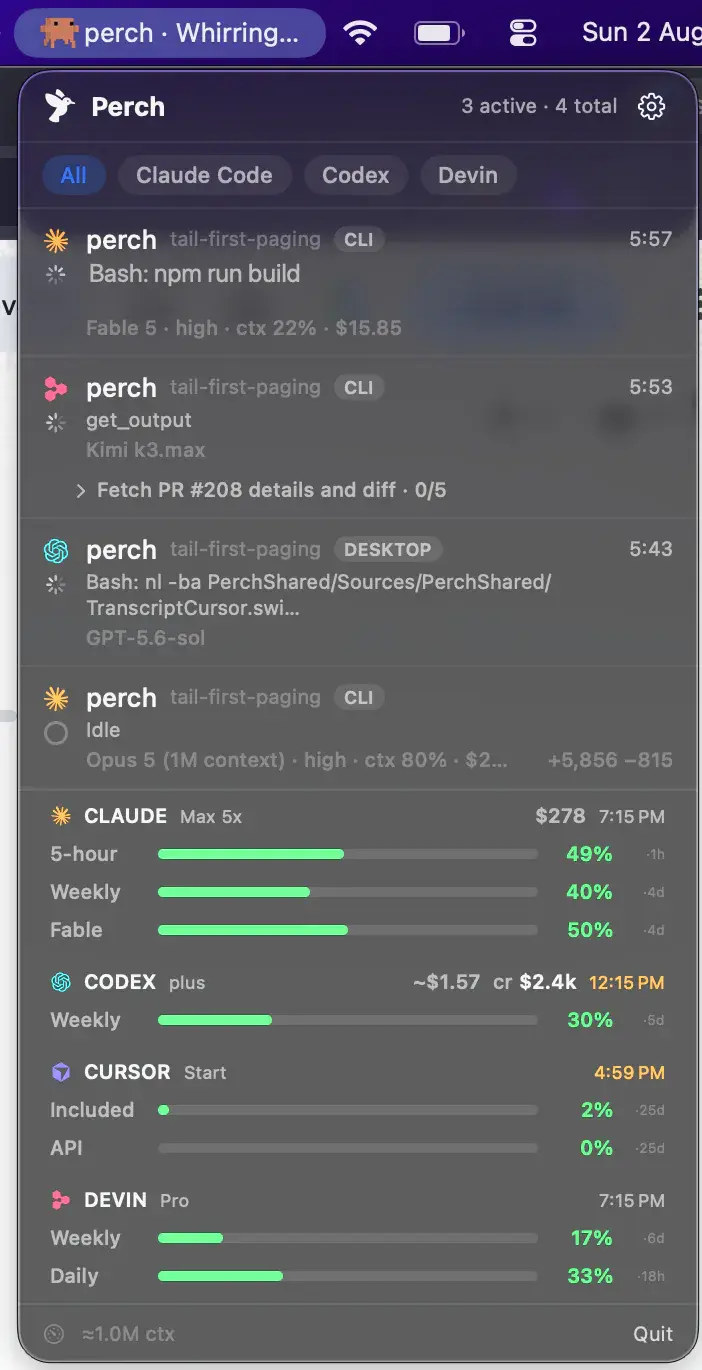
The actual app — live state, context & spend per session

api-gateway needs approval
Bash · npm run db:migrate
Perch Companion — the iPhone app, included
Step away. Keep typing.
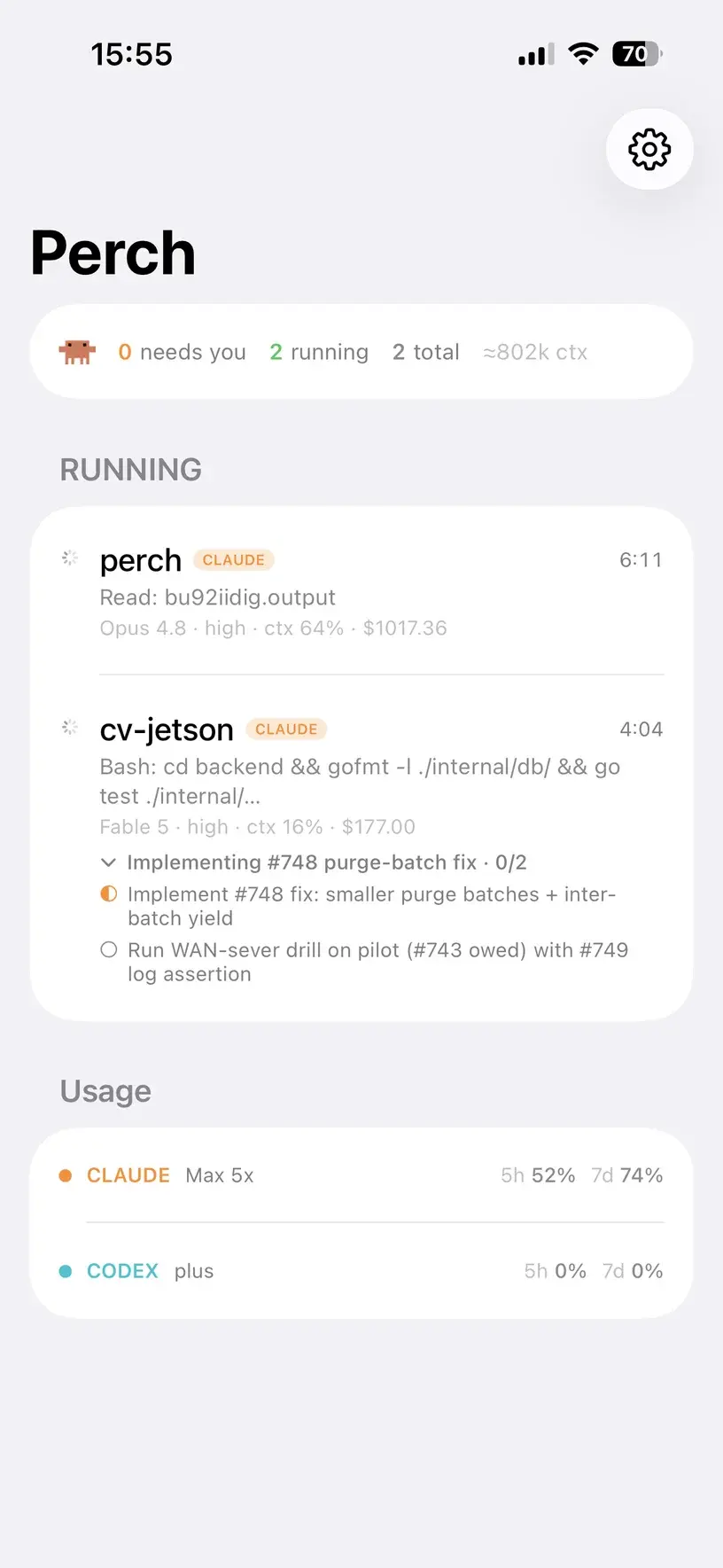
Every license includes Perch Companion, the iPhone app. Kick off a long refactor and go make coffee: your phone mirrors the whole fleet, raises a Live Activity while agents work, and pings you when one blocks. Allow and Deny are on the alert itself — Face ID, one tap, done — and a multiple-choice question is a tap through. With Perch Pro you can also read the whole conversation and type a new instruction into the session, then watch the turn pick up again.
- Live fleet mirror — every session and state, in your pocket
- Perch Pro— read a session’s conversation, and type a full reply back into the agent’s own composer, on every agent Perch supports
- Perch Pro— stop a turn that’s going wrong: Claude Code, Codex, OpenCode and Antigravity; the rest were measured and their interrupt keys do something else
- Answer Claude’s multiple-choice questions with a tap — off by default, in Settings → Notifications
- Your Mac stays locked the whole time — text arrives through tmux or herdr, and neither needs the screen
- A Live Activity that starts itself the moment agents get to work — session rows, timers ticking live, task progress on your lock screen
- Allow and Deny on the permission alert — Allow asks for Face ID first, then the app connects and confirms on screen, or says plainly if the window closed
- Approvals arrive with a draining countdown, in the Dynamic Island too
- Pairs over your LAN, or anywhere via your own Tailscale tailnet — end-to-end encrypted
Typing is a Perch Pro feature, and it has to be switched on in Settings separately — paying for Pro is not the same as consenting to remote input. It also needs the session running in tmux or herdr— Perch won’t type at a pane it can’t name, so a session in neither gets no composer rather than a dead one. OpenCode is the exception: start it with --port and Perch talks to its own API, which addresses the thread by id instead of whatever the screen happens to be showing.
Perch – Agent Monitor · Included with every license · iOS 18 or later
Perch on Apple Watch
The fleet, on your wrist.
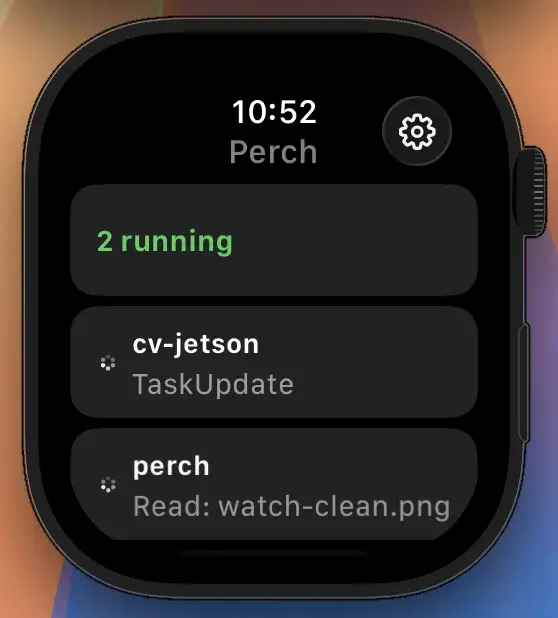
Raise your wrist to see how many agents are running, which sessions need you, and what each one is doing right now — no phone in hand. A Smart Stack widget surfaces the count before you even open the app.
- Running count and live session states, glanceable in a second
- Approve or deny from your wrist — the whole loop, no phone in hand
- Smart Stack widget puts the fleet — and your stats digest — in your watch face rotation
- Ships inside the iPhone app — nothing separate to find on the App Store — and pairs through your phone on the same encrypted link
Included with every license · watchOS 11 or later
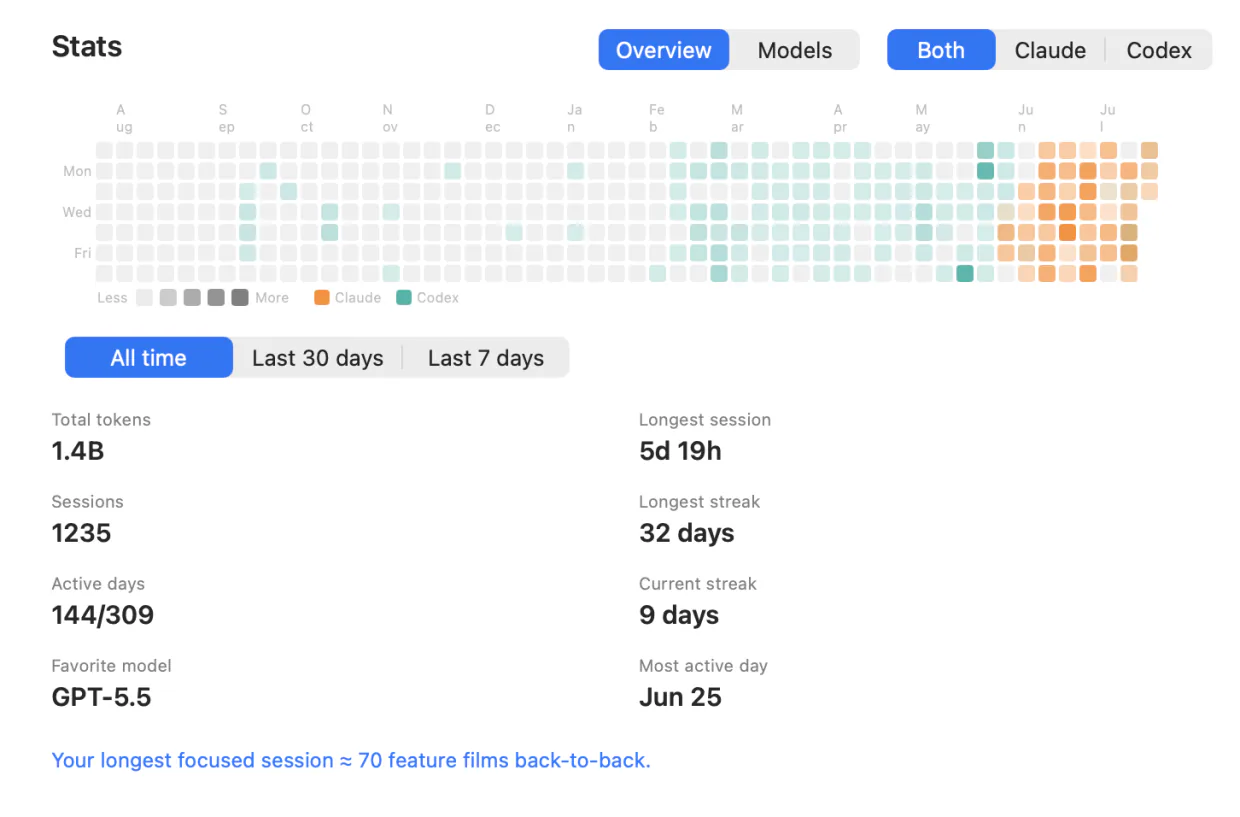
Stats — your year in agents
Every session you've ever run, counted.
Perch keeps a local history of every run and turns it into a dashboard: a contribution heatmap of your agent days, and an honest account of what you spend your tokens on. It reads your own files on your own Mac — nothing is uploaded to build it.
- A per-day heatmap, colored by the agent you ran that day
- Total tokens, sessions, and active days — all-time, 30 days, or 7
- Current and longest streak, so you can see the run you're on
- Longest session, most-active day, favorite model and the breakdown behind it
- Filter to one agent at a time — and read the digest on your phone and watch
What you get
Built for the parallel-agent workday
The whole fleet, one glance
Every session, its state, and how long it's been there — running, waiting, idle, done — in colors you can read across the room, each row marked with the agent that owns it.
Sessions show their own name
A conversation appears under the title you gave it — or the one the agent wrote for it — instead of the folder it happens to run in. Two sessions in the same project are finally told apart.
Approvals — and answers — in one click
Permission prompts surface the moment they appear. Approve or deny without hunting for the right terminal, and type a reply straight back when an agent asks a question.
Answer from your pocket
Allow and Deny sit on the notification itself — Face ID, one tap, and the decision reaches your Mac while it sits locked on the desk. Tap through Claude's multiple-choice questions the same way. Add Perch Pro and you can read the whole conversation and type a new instruction straight into the session.
Task lists, tracked to the last item
Perch reads the agent's own checklist, so a long run reads as “task 4 of 5” with the current step named — on the Mac, and on your lock screen.
Background agents count as working
When the main thread hands off to subagents, the session stays running instead of falsely going idle — so the “finished” ping lands when the work is actually done.
Jump straight to the session
One click lands you inside the session, not just the app: the exact pane in Warp and iTerm2, the exact split in Ghostty, the exact tab in Terminal.app, the conversation inside Codex Desktop. Inside tmux or Zellij it selects the right window and pane first. Eight more terminals open by name, and an unrecognised one is opened best-effort.
Usage, limits, and spend
Per-session context and cost, and per-model limit bars on by default — 5-hour and weekly windows read straight from the provider, so they keep moving when a session goes idle. Today's spend, your plan, credit balance, and a heads-up before you run out.
It tells you when it isn't current
When your Mac sleeps every agent pauses with it, so Perch stops presenting the last thing it saw as live. One line as it goes to sleep, one while it re-checks on waking, and one if checks stop landing for any other reason. Your phone and watch say how old the view is instead of spinning. And if you'd rather it didn't doze off mid-task, an opt-in holds off idle sleep while an agent is verifiably running — closing the lid still sleeps the Mac, as it should.
7 agents, one fleet
Hooks report state instantly and install themselves — one install per agent, covering CLI, desktop and IDE alike; a transcript scan catches sessions started before Perch. Claude Code, Codex, Cursor, Devin, OpenCode, Amp and Antigravity, side by side in the same list.
Never slows an agent
Reporters are fire-and-forget with a hard send timeout, and fail open on every path. A hook will never stall your session.
Quiet, native, signed
A pure-Swift menu bar app that stays light while your whole fleet works — no Electron, no daemon farm. Notarized by Apple, and updated over a signed Sparkle feed you can inspect.
Jump to the exact session

Warp
exact pane

iTerm2
exact pane

Ghostty
exact split

Terminal.app
exact tab

Codex Desktop
exact conversation
Coming soon
More agents joining the fleet. Tell us which one you run.
- Cline
- Kilo Code
Privacy
Local-first, by architecture
Stays on your Mac
Session state, transcripts, usage, and cost live in local files — the app reads them over a Unix socket. Close Perch and nothing phones home.
Leaves only if you opt in
Pairing your iPhone sends fleet snapshots to it — encrypted, over your LAN or your own tailnet. Push alerts pass transiently through a relay that stores only a hashed license identity.
Verifiable
The trust boundaries and threat model are documented publicly, and every update ships notarized with a signed appcast you can inspect.
Pricing
Pay once for the fleet. Subscribe for the conversation.
Buy the Mac app once and keep it, or subscribe to Perch Pro and get it along with the conversation view for as long as you subscribe. Solo and Team are lifetime licences with all updates included; checkout is handled by Polar, and Pro by the App Store.
Solo
- Lifetime license — pay once, keep it
- One Mac at a time; deactivate in-app to move
- iOS companion, push alerts & Live Activities included
- Notarized app with signed automatic updates
Team
- A license key for every teammate — not one shared key
- Assign and revoke seats by email from your customer portal
- Your seat is claimed on purchase; invite the rest by email
- Same lifetime license and updates on every seat
- Perch Pro is separate — each teammate who wants it subscribes in the iPhone app
Pro
Most popularor $29 a year
Launch price until 30 September, then $49 a year
- A Mac app licence included, for as long as you subscribe — nothing separate to buy
- Read your agents’ conversations from your iPhone, and reply straight back into the session
- Works with your Mac locked, from anywhere your phone can reach it*
Free to download · Pro is an in-app purchase
* What Pro can reach depends on the agent and on where its session is running. Replying needs the session inside tmux or herdr — OpenCode uses its own local port instead — and it has to be switched on in Settings, because paying for Pro is not the same as consenting to remote input. Reading a conversation works wherever the session runs. Each agent’s own page says exactly what it supports, and what it doesn’t.
Prices in USD, tax included.
Questions